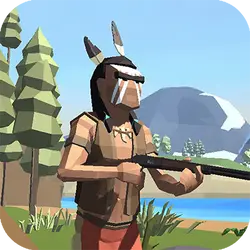
The Shooter PRO is a free arcade game you can play right here in your browser. It leans on shooting, so expect plenty of replay value. It works the same on desktop, tablet and phone, and your progress picks up where the game left it.
About The Shooter PRO
The Shooter Pro is a family-friendly platform shooter. Walk, run, jump, double jump, shoot while avoiding obstacles and enemies. One hit will send you back to the beginning of the level to try again. Reach the flag, for a win, and try an even more challenging level.
How to play The Shooter PRO
There is very little to learn before your first run. The full control mapping is in the table below and takes a moment to skim. It fills the player in landscape, so use the fullscreen button on desktop and turn your phone sideways on mobile. Most players get the hang of it inside two or three attempts.
Controls
| Input | Action |
|---|---|
| Mouse | Aim |
| Left click | Fire |
| WASD | Move |
| R | Reload |
On mobile: Tap and swipe on screen. Turn your phone sideways — this game is designed for landscape and fills a horizontal screen.
Why it is worth playing
The Shooter PRO is the kind of game that fits into a gap between other things. Two minutes is a real session, and so is an hour. The result is something you can pick up cold months later.
At a glance
- Free to play with no account required
- Runs in the browser — nothing to download or install
- Landscape layout with fullscreen support
- Keyboard and mouse on desktop, full touch support on mobile.
- Shooting gameplay — Aim, fire, repeat
- Added to our catalogue from a 2023 release
Frequently asked questions
Is The Shooter PRO free to play?
Yes. The Shooter PRO is completely free and runs in your browser. There is no purchase, no subscription and no account needed — open the page and play.
Do I need to download or install anything?
No download, no installer, no plugin. The Shooter PRO is HTML5, so the browser plays it directly.
Can I play The Shooter PRO on my phone?
Yes. Tap and swipe on screen. Turn your phone sideways — this game is designed for landscape and fills a horizontal screen.
What are the controls for The Shooter PRO?
Keyboard and mouse on desktop, full touch support on mobile. Mouse — aim; Left click — fire; WASD — move; R — reload.
Can I play The Shooter PRO fullscreen?
Yes — the button in the top-right corner of the player goes fullscreen, and Escape returns you to the page.
What kind of game is The Shooter PRO?
The Shooter PRO is a arcade game built around shooting. If that is the sort of thing you enjoy, the related games further down the page are picked using the same tags.