Drop-It is a free arcade game you can play right here in your browser. Think puzzle and block & tetris-like — that is the shape of it. It works the same on desktop, tablet and phone, and your progress picks up where the game left it.
About Drop-It
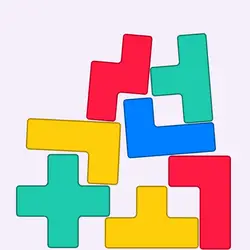
Drop-It is a fun and relaxing block puzzle game. Drag "block" to move it horizontally, then drop it to make a move. If a line of row is filled, blocks at this line will be removed and your score will be increased.
How to play Drop-It
There is no tutorial to sit through — the game explains itself. The full control mapping is in the table below and takes a moment to skim. The game runs in portrait, so on a phone you can play one-handed, and on desktop it stays centred rather than stretched out of shape. Expect the first attempt to be a write-off; that is normal here.
Controls
| Input | Action |
|---|---|
| Mouse | Select and drag pieces |
| Left click | Confirm a move |
On mobile: Tap and swipe directly on the screen. The game is built for portrait, so you can play one-handed without rotating your phone.
Why it is worth playing
Arcade games live or die on how fast they get going. Drop-It gets going immediately. That is a rarer quality than it sounds.
At a glance
- Free to play with no account required
- Runs in the browser — nothing to download or install
- Portrait layout, comfortable one-handed on mobile
- Keyboard and mouse on desktop, full touch support on mobile.
- Puzzle gameplay — Slow down and solve it
- Block & Tetris-like gameplay — Fit the shapes, clear the lines
- Added to our catalogue from a 2021 release
Frequently asked questions
Is Drop-It free to play?
Yes. Drop-It is completely free and runs in your browser. There is no purchase, no subscription and no account needed — open the page and play.
Do I need to download or install anything?
No download, no installer, no plugin. Drop-It is HTML5, so the browser plays it directly.
Can I play Drop-It on my phone?
It works on phones and tablets. Tap and swipe directly on the screen. The game is built for portrait, so you can play one-handed without rotating your phone.
What are the controls for Drop-It?
Keyboard and mouse on desktop, full touch support on mobile. Mouse — select and drag pieces; Left click — confirm a move.
Can I play Drop-It fullscreen?
There is a fullscreen control in the top-right of the player. Press Escape when you want the page back.
What kind of game is Drop-It?
Drop-It is a arcade game built around puzzle and block & tetris-like. If that is the sort of thing you enjoy, the related games further down the page are picked using the same tags.