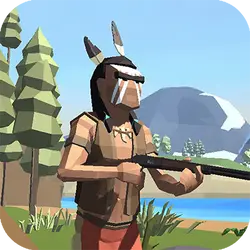
Looking for a quick arcade game? Call of Ops 2 runs in the browser and needs no download. It leans on shooting, so expect plenty of replay value. There is no sign-up, no launcher and no wait — press play and you are in.
About Call of Ops 2
Call of Ops 2 features next-gen graphics and big arsenal of weapons to shoot rival players on different maps.
How to play Call of Ops 2
The opening minute doubles as the tutorial. Nothing about the control scheme is unusual; the table below covers all of it. Landscape layout: give it the fullscreen button on desktop, or rotate your phone. Most players get the hang of it inside two or three attempts.
Controls
| Input | Action |
|---|---|
| Mouse | Aim |
| Left click | Fire |
| WASD | Move |
| R | Reload |
On mobile: Tap and swipe on screen. Turn your phone sideways — this game is designed for landscape and fills a horizontal screen.
Why it is worth playing
What keeps Call of Ops 2 worth returning to is how quickly a single round resolves. It respects your time — you are never more than a click from another attempt. It works as well on a phone on a bus as it does on a desktop.
At a glance
- Free to play with no account required
- Runs in the browser — nothing to download or install
- Landscape layout with fullscreen support
- Keyboard and mouse on desktop, full touch support on mobile.
- Shooting gameplay — Aim, fire, repeat
- Added to our catalogue from a 2022 release
Frequently asked questions
Is Call of Ops 2 free to play?
It is free. There is no trial, no unlock and no sign-up wall on Call of Ops 2 — the page you are on is the whole thing.
Do I need to download or install anything?
No download, no installer, no plugin. Call of Ops 2 is HTML5, so the browser plays it directly.
Can I play Call of Ops 2 on my phone?
It works on phones and tablets. Tap and swipe on screen. Turn your phone sideways — this game is designed for landscape and fills a horizontal screen.
What are the controls for Call of Ops 2?
Keyboard and mouse on desktop, full touch support on mobile. Mouse — aim; Left click — fire; WASD — move; R — reload.
Can I play Call of Ops 2 fullscreen?
Yes — the button in the top-right corner of the player goes fullscreen, and Escape returns you to the page.
What kind of game is Call of Ops 2?
Call of Ops 2 is a arcade game built around shooting. If that is the sort of thing you enjoy, the related games further down the page are picked using the same tags.