Merge Squares drops you into a puzzle challenge you can start in a couple of seconds. Think puzzle, merge and math — that is the shape of it. Everything runs client-side, so it starts fast even on a modest connection.
About Merge Squares
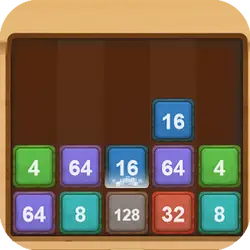
"Merge Squares" is an exciting puzzle game, where your task is to connect squares with same numbers. Using logic and strategic mind, you have to decide how to arrange the squares to combine them into one. Each level gets harder, how far can you go?
How to play Merge Squares
Press play and the first round teaches you the rest. Nothing about the control scheme is unusual; the table below covers all of it. The game runs in portrait, so on a phone you can play one-handed, and on desktop it stays centred rather than stretched out of shape. Expect the first attempt to be a write-off; that is normal here.
Controls
| Input | Action |
|---|---|
| Mouse | Select and drag pieces |
| Left click | Confirm a move |
On mobile: Tap and swipe directly on the screen. The game is built for portrait, so you can play one-handed without rotating your phone.
Why it is worth playing
Merge Squares does one thing and does it properly. There is no bloat around the edges, which is exactly what you want from a puzzle game in a browser tab. That is the whole pitch, and it is enough.
At a glance
- Free to play with no account required
- Runs in the browser — nothing to download or install
- Portrait layout, comfortable one-handed on mobile
- Keyboard and mouse on desktop, full touch support on mobile.
- Puzzle gameplay — Slow down and solve it
- Merge gameplay — Combine two to make something better
- Math gameplay — Mental arithmetic that does not feel like homework
- Added to our catalogue from a 2023 release
Frequently asked questions
Is Merge Squares free to play?
It is free. There is no trial, no unlock and no sign-up wall on Merge Squares — the page you are on is the whole thing.
Do I need to download or install anything?
Nothing at all. Merge Squares runs in the browser tab you already have open, the same way a video or a map does.
Can I play Merge Squares on my phone?
Yes. Tap and swipe directly on the screen. The game is built for portrait, so you can play one-handed without rotating your phone.
What are the controls for Merge Squares?
Keyboard and mouse on desktop, full touch support on mobile. Mouse — select and drag pieces; Left click — confirm a move.
Can I play Merge Squares fullscreen?
Yes. Use the fullscreen button in the top-right of the game player to expand it to the whole screen, and press Escape to come back out.
What kind of game is Merge Squares?
Merge Squares is a puzzle game built around puzzle, merge and math. If that is the sort of thing you enjoy, the related games further down the page are picked using the same tags.