Looking for a quick adventure game? Duo Nether runs in the browser and needs no download. The core of it is memory. It works the same on desktop, tablet and phone, and your progress picks up where the game left it.
About Duo Nether
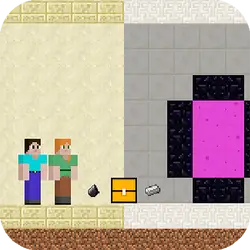
Things are getting even tougher in the second part of the series, so are you up for this adventure? The adventure is getting increasingly difficult. There are monsters and traps everywhere. Tell your friend right away and join this adventure. Remember, youre in for an even more challenging adventure. Steve and Alex are now stronger with their swords. You must be high off the ground to throw the sword. Jump-Throw the sword and kill all the enemies. Collect all the white bone dust stones. Open the chests and both of you reach the door. *Played with WASD + Arrow Keys. *Mobile touch control is available *To throw the sword, use the Q and P keys.
How to play Duo Nether
You can work the whole thing out by playing it. You will want a keyboard for this one — the arrow keys / WASD carry most of it, and the table below has the rest. The game is wide rather than tall — fullscreen is worth it on a monitor, and on a phone the picture is much better sideways. Nothing is lost by trying something reckless once.
Controls
| Input | Action |
|---|---|
| Mouse | Navigate menus and interact |
| Arrow keys / WASD | Move |
| Spacebar | Primary action |
On mobile: Tap and swipe on screen. Turn your phone sideways — this game is designed for landscape and fills a horizontal screen.
Why it is worth playing
What keeps Duo Nether worth returning to is how quickly a single round resolves. It respects your time — you are never more than a click from another attempt. It is not trying to be anything larger, and it is better for it.
At a glance
- Free to play with no account required
- Runs in the browser — nothing to download or install
- Landscape layout with fullscreen support
- Keyboard and mouse on desktop, full touch support on mobile.
- Memory gameplay — Train your recall
- Added to our catalogue from a 2023 release
Frequently asked questions
Is Duo Nether free to play?
It is free. There is no trial, no unlock and no sign-up wall on Duo Nether — the page you are on is the whole thing.
Do I need to download or install anything?
No. Duo Nether is an HTML5 game that runs inside the page itself. There is nothing to install, no plugin and no launcher — it loads like any other web page.
Can I play Duo Nether on my phone?
Yes — mobile is fully supported. Tap and swipe on screen. Turn your phone sideways — this game is designed for landscape and fills a horizontal screen.
What are the controls for Duo Nether?
Keyboard and mouse on desktop, full touch support on mobile. Mouse — navigate menus and interact; Arrow keys / WASD — move; Spacebar — primary action.
Can I play Duo Nether fullscreen?
There is a fullscreen control in the top-right of the player. Press Escape when you want the page back.
What kind of game is Duo Nether?
Duo Nether is a adventure game built around memory. If that is the sort of thing you enjoy, the related games further down the page are picked using the same tags.